Instantly Filter Tasks by Tag in Your Project Board
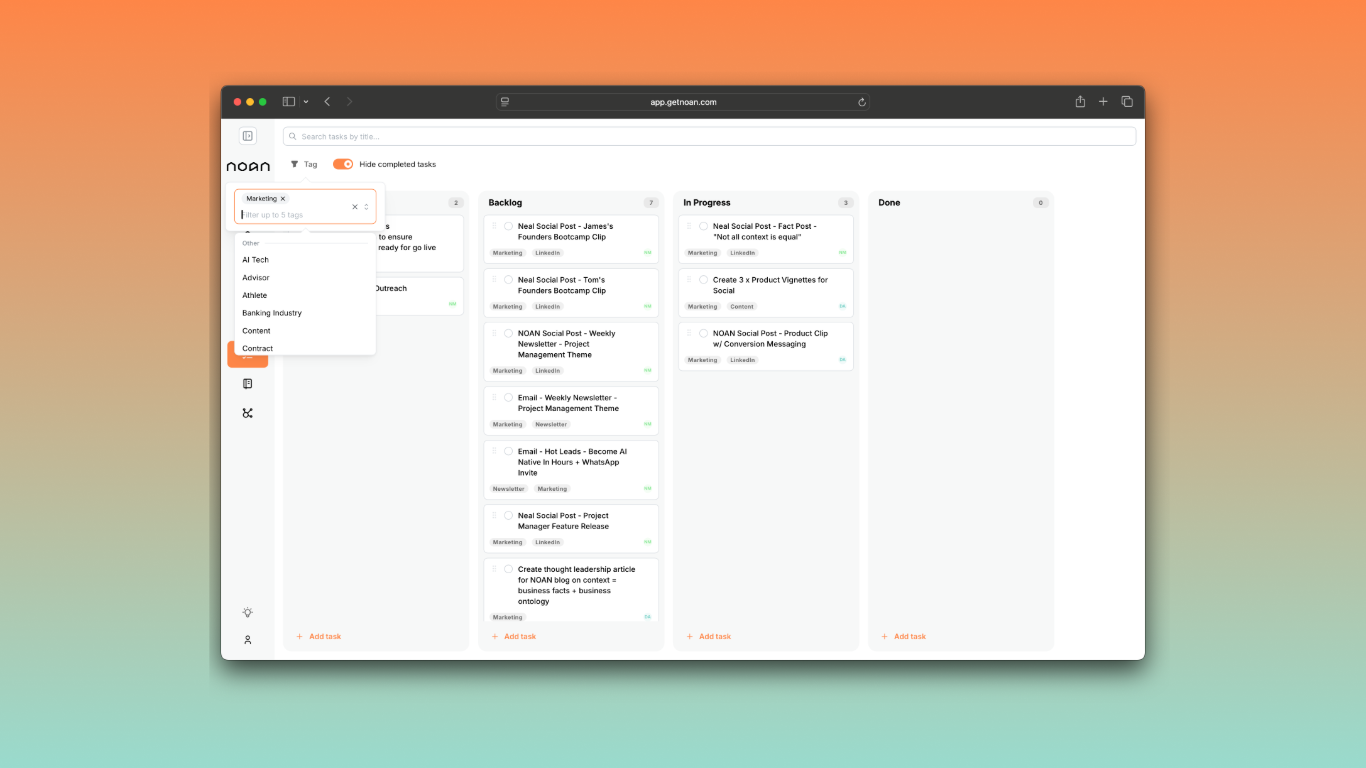
You can now slice and dice your project management board by any tag—marketing, sales, emails, or whatever you choose. Just select a tag, and your master board instantly filters to show only the tasks that matter for that function.
Why it matters:
No more juggling multiple boards or losing track of priorities. With tag-based filtering, you get one unified board that adapts to your workflow—see just your marketing tasks, sales pipeline, or content to-dos with a single click.
How to Use:
- Assign tags (e.g., "Marketing," "Sales," "Email") to your tasks as you create them.
- In your project board, use the tag filter to instantly view only the tasks you want.
- Mix and match tags for custom views—perfect for solo founders and teams alike.
Pro Tip:
Set up tags for recurring workflows (like "Weekly Review" or "Urgent") to create dynamic, always-relevant boards without extra admin.
Other Improvements:
- Tag management is now even easier—create, edit, and assign tags directly from the assistant or your settings.
- Smarter auto-tagging ensures every new task lands in the right place.
- Tasks now available in nav.
Try it now: Head to your project board, assign a few tags, and see how fast you can focus on what matters most.